
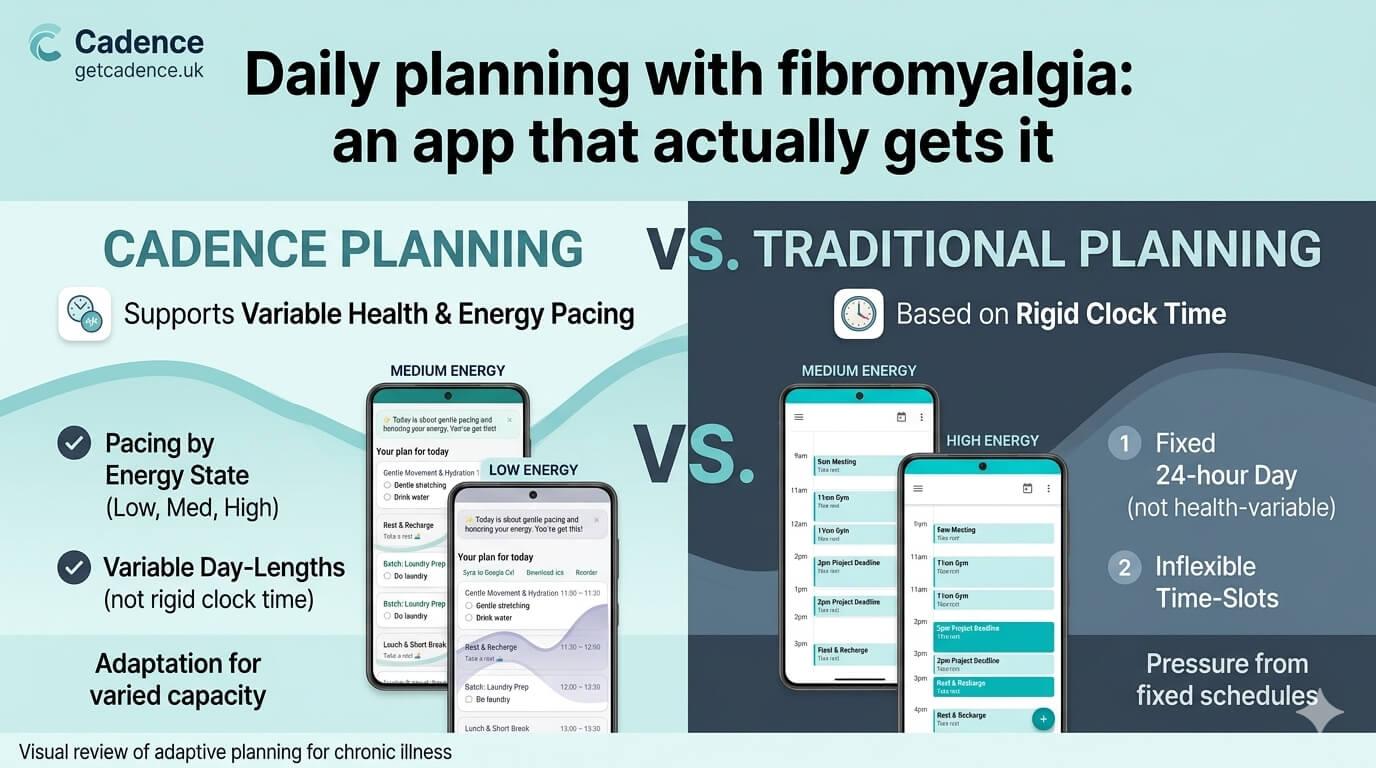
Daily planning with fibromyalgia: an app that actually gets it
Planning with fibromyalgia is its own particular challenge. You can't predict good days and bad days in advance. You can't commit to a fixed schedule and expect to stick to it. And most apps, however well-designed, were built by people who've never had to weigh up whether a shower counts as a task.
Cadence was built by someone with fibromyalgia, for exactly this.
The core difference
Cadence doesn't ask you to plan tomorrow based on how you hope to feel. It asks how you're doing right now. When you plan your day, it checks in on energy and focus, adjusts for how much time you have available, and builds a realistic plan from your actual task list.
There's no fixed daily schedule to fall behind on. No streak to break. No notification telling you you've missed something you'd already written off at 8am.
When the day doesn't go to plan
There's a mid-day reschedule built in. If a flare hits mid-morning, you can tell Cadence and it'll rebuild what's left around your current capacity. Tasks that don't happen roll over to the next day.
Privacy
Cadence is designed with privacy as a priority. Your data stays yours. There's no advertising layer. The AI planning is powered by your inputs — not by selling your health data.
Pricing
Free to use, including AI planning. Pro is £5.99/month for Google Calendar sync, cross-device sync, and Ask Cadence AI chat. No card required.
x
Subscribe to Updates
If you enjoyed this, why not subscribe to free email updates ?
Subscribe to Blog updates
Alternatively, you can subscribe via RSS 
All email subscriptions must be confirmed to comply with GDPR.
Related Posts
Cadence | 23rd July 2026 | Use Cases
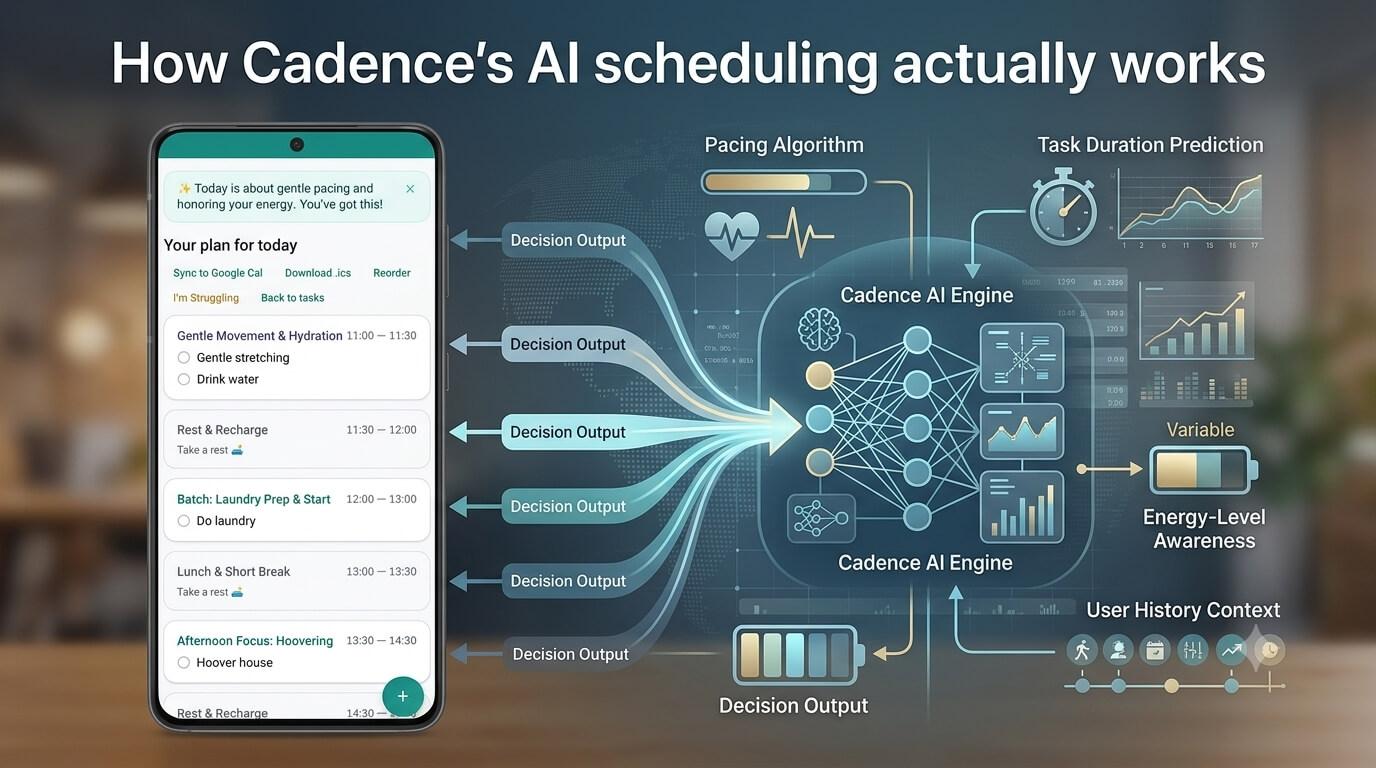
A lot of "AI-powered" planning apps amount to a thin wrapper around a chatbot that's been told to "be helpful and encouraging." You ask it to plan your day, and it gives you a list that looks plausible but ignores the fact that your dentist appointment is fixed at 2pm, or schedules four "deep focus" blocks back to back like that's a thing a human can do. Cadence uses Gemini to build your day plan too — but getting it to behave took more work than just writing a friendly prompt. The problem with "just ask nicely" Early versions of the scheduling prompt buried constraints in regular sentences — "please try to keep fixed appointments where they are" mixed in with a dozen other instructions. The model would routinely ignore it. Not maliciously, just... it's a lot of text, and soft instructions get lost in soft instructions. What actually works: shouting (politely) in headers The fix turned out to be structural, not tonal. Breaking the prompt into clearly named, ALL-CAPS sections — FIXED TIME CONSTRAINTS, PRIORITY RULES, TASK NAMES — made an enormous difference to how reliably the model respects them. It's a bit like the difference between mentioning something in passing during a meeting versus putting it on a slide with a heading. Same information, very different chance of it landing. What goes into the plan When Cadence builds your day, it's pulling from several layers: Your profile — energy and focus peak times, whether you need regular breaks (and how long), hard limits you've set, and a free-text "Your situation" field where you can describe what's actually going on: conditions, circumstances, anything the AI should know that doesn't fit in a dropdown. This is passed anonymously to the model when building your plan; it's never stored on the servers. Today's check-in — your energy and/or focus level right now, what time you're available from and until, and whether to plan from the current moment or lay out the full day from the start. Your tasks — with priority levels, any fixed times (more on those below), and optional notes that give the AI context about effort or complexity without those notes ever appearing in the output. The result isn't just a reordered to-do list. The AI is told to treat your profile constraints as hard rules, not suggestions — scheduling demanding work during your peak window, pacing breaks appropriately, and leaving breathing room rather than cramming the day full. Fixed times are actually fixed One of the most important things the scheduling prompt enforces: if a task has a fixed time, it does not move. Not for low energy, not to make room for something else, not ever. Tasks with both a start and end time are scheduled exactly there. Tasks with only a start time get placed at that time with an assumed 30-minute duration. The prompt makes this explicit with some fairly firm language: fixed-time tasks are never moved to unscheduled. High priority tasks follow a similar rule — if something has to get dropped to fit the day, it comes from low priority first, then medium, then high. Energy and focus level affect pacing, not which tasks make the cut. What happens when the day goes sideways Plans made at 8am rarely survive contact with 2pm. Cadence has a mid-day reschedule feature — you tell it your current energy and focus level, add any context ("my pain levels are bad," "I lost two hours to an unexpected call"), and it rebuilds the rest of the day from the current moment. The reschedule logic works from your remaining incomplete tasks, keeps anything that happened in past blocks exactly where it was, and only schedules from now onwards — it won't invent earlier times to fit things in. If there genuinely isn't enough time left, tasks go into a "couldn't fit" list rather than getting squeezed into an impossible schedule. Task names: a surprisingly hard problem Left to its own devices, an LLM asked to produce a task list will helpfully paraphrase, summarise, append no...
Cadence | 14th June 2026 | Use Cases
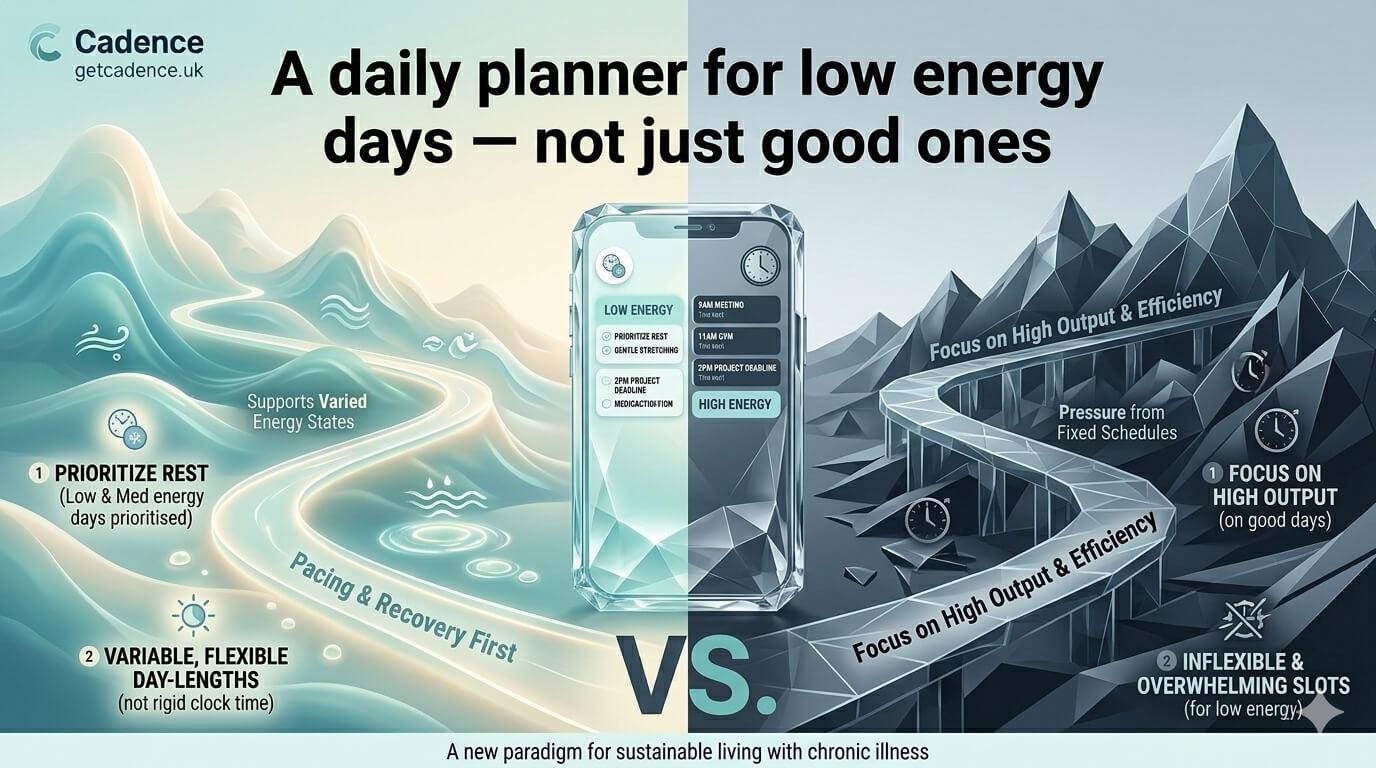
Most productivity apps have an implicit target user: someone with consistent energy, reliable focus, and enough capacity to follow a schedule they set the day before. If that's not you, most apps will just make you feel worse about it. Cadence is built for the other days. The slow starts. The mid-afternoon crashes. The days where you have two hours and need to make them count. What makes it different Before you build your day, Cadence asks how your energy and focus are sitting. It then plans around that — pulling from your task list and matching tasks to what you've actually got. If you're operating at low capacity, it'll prioritise accordingly. Mid-day reschedule is built in. If energy drops further, or something takes longer than expected, you can reset your plan from wherever you are without losing what's already been done. No guilt architecture Tasks that don't get done roll over. There are no streaks to protect. No daily score. No app notifications implying you could have done more. Just a plan that works with your energy instead of against it. Pricing Free tier includes AI planning, task rollover, and push notifications. Pro (£5.99/month) adds Google Calendar sync, cross-device sync, and the Ask Cadence AI chat. No card required to start. 👉 Get Cadence today...
Cadence | 14th June 2026 | Use Cases
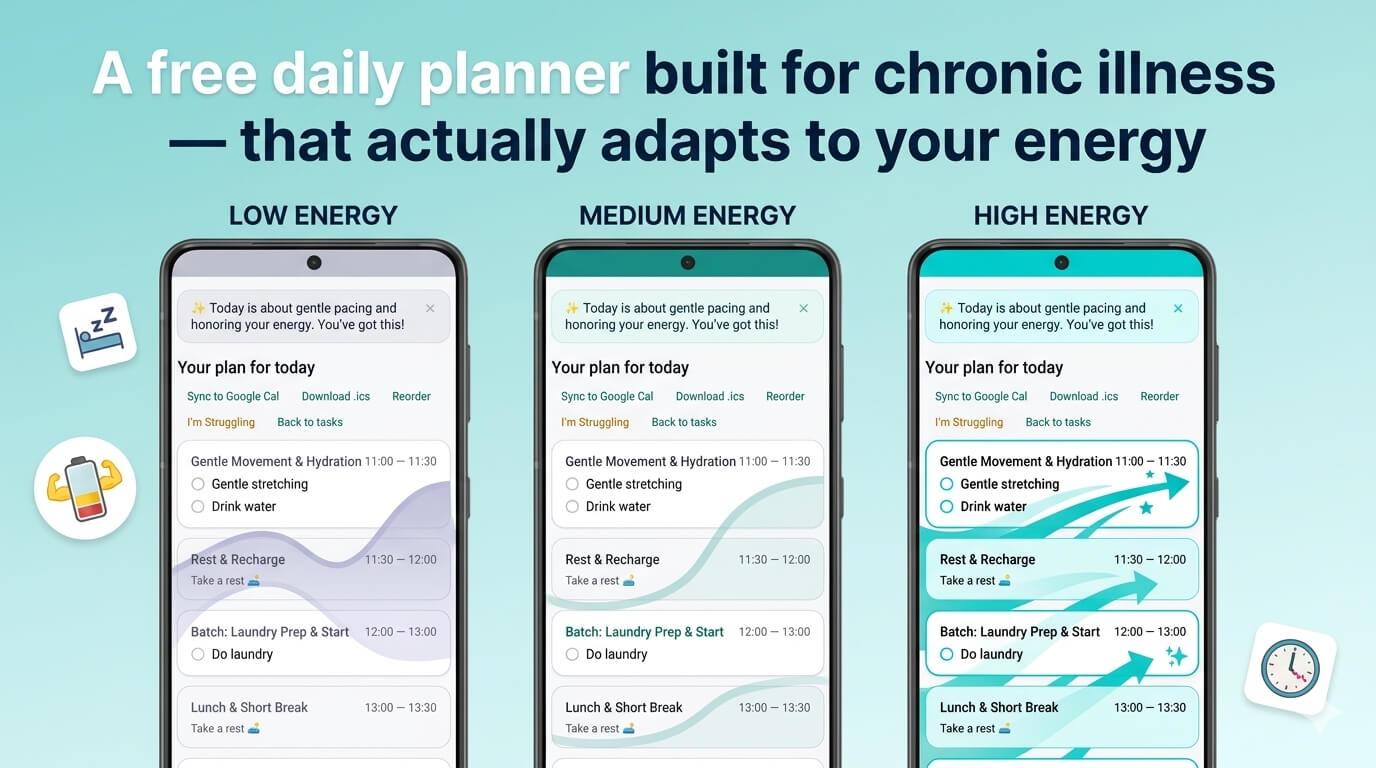
Most productivity apps are built on an assumption so obvious nobody says it out loud: that you'll have roughly the same capacity every day. For people with chronic illness, that assumption invalidates most of the tools before they're even opened. An app that tells you to follow the same schedule regardless of how you're feeling isn't a planning tool — it's a daily reminder of the gap between what you intended and what your body allowed. Cadence was built specifically to close that gap. How it works Each morning, Cadence asks how your energy and focus are doing. When you're ready to plan your day with AI, it also asks how much time you have available. Then it builds your day from your task list based on those answers — not from a fixed schedule or an idealised version of you. Low energy day? It plans accordingly. If you tell it you've got a couple of hours and your energy is at the floor, it won't serve you five demanding tasks and expect you to get through them. Mid-day adaptability If things change — and with chronic illness, they usually do — there's a mid-day reschedule option. You tell Cadence things have shifted, it rebuilds the rest of your day from where you actually are. Nothing gets lost. Tasks roll over automatically. What it doesn't do Cadence won't cure your bad days or pretend they don't exist. It won't give you a motivational speech. It'll just help you figure out what's actually possible with what you've got — and make sure the things that matter most are accounted for. Pricing Free tier includes AI-powered daily planning, task management, and rollover. Pro (£5.99/month) adds Google Calendar sync, cross-device sync, and the Ask Cadence AI chat. No card required to start. 👉 Get Cadence today...
Cadence | 06th June 2026 | Use Cases
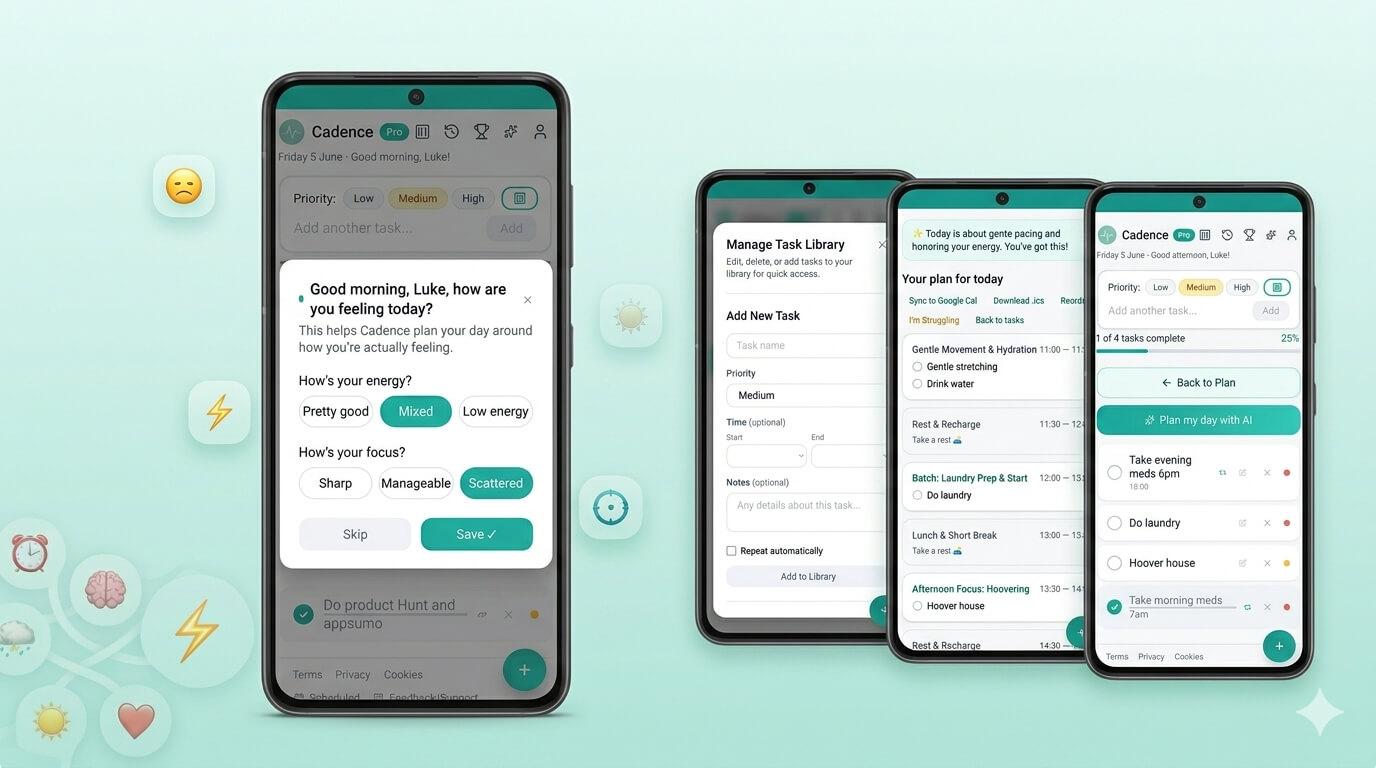
Most productivity apps were designed by people who don't have ADHD, for people who don't have ADHD. The result is usually a long list of tasks, a calendar with time blocks, and a quiet implication that if you just stuck to the plan, everything would be fine. If you have ADHD, you already know the problem with that. The plan made sense yesterday. Today your focus is scattered, you've already spent an hour on something that wasn't on the list, and the whole schedule feels like evidence of failure rather than a useful tool. Cadence works differently. It starts with how you're doing today Every morning, Cadence asks you three questions: how's your energy, how's your focus, and how much time do you actually have. Then it builds your day from your task list based on those answers — not based on some ideal version of you that exists only on good days. High energy and good focus? It'll suggest your heavier tasks. Scattered and low? It'll give you something manageable and protect your limited capacity. It rolls with you, not against you ADHD days rarely go to plan. Cadence has a mid-day reschedule built in — you can tell it things have gone sideways and it'll rebuild the rest of your day from where you actually are, not where you were supposed to be. Tasks that don't get done roll over automatically. Nothing disappears into the void. What it doesn't do Cadence isn't a project manager. It won't handle complex workflows or team collaboration. It's a daily planner — specifically for people who struggle with the daily part. Pricing Free tier includes AI-powered daily planning, task management, rollover, and push notifications. Pro (£5.99/month) adds Google Calendar sync, cross-device sync, and the Ask Cadence AI chat. No trial period that expires. The free version is actually free. 👉 Get Cadence today....
Cadence | 23rd July 2026 | Use Cases
A lot of "AI-powered" planning apps amount to a thin wrapper around a chatbot that's been told to "be helpful and encouraging." You ask it to plan your day, and it gives you a list that looks plausible but ignores the fact that your dentist appointment is fixed at 2pm, or schedules four "deep focus" blocks back to back like that's a thing a human can do. Cadence uses Gemini to build your day plan too — but getting it to behave took more work than just writing a friendly prompt. The problem with "just ask nicely" Early versions of the scheduling prompt buried constraints in regular sentences — "please try to keep fixed appointments where they are" mixed in with a dozen other instructions. The model would routinely ignore it. Not maliciously, just... it's a lot of text, and soft instructions get lost in soft instructions. What actually works: shouting (politely) in headers The fix turned out to be structural, not tonal. Breaking the prompt into clearly named, ALL-CAPS sections — FIXED TIME CONSTRAINTS, PRIORITY RULES, TASK NAMES — made an enormous difference to how reliably the model respects them. It's a bit like the difference between mentioning something in passing during a meeting versus putting it on a slide with a heading. Same information, very different chance of it landing. What goes into the plan When Cadence builds your day, it's pulling from several layers: Your profile — energy and focus peak times, whether you need regular breaks (and how long), hard limits you've set, and a free-text "Your situation" field where you can describe what's actually going on: conditions, circumstances, anything the AI should know that doesn't fit in a dropdown. This is passed anonymously to the model when building your plan; it's never stored on the servers. Today's check-in — your energy and/or focus level right now, what time you're available from and until, and whether to plan from the current moment or lay out the full day from the start. Your tasks — with priority levels, any fixed times (more on those below), and optional notes that give the AI context about effort or complexity without those notes ever appearing in the output. The result isn't just a reordered to-do list. The AI is told to treat your profile constraints as hard rules, not suggestions — scheduling demanding work during your peak window, pacing breaks appropriately, and leaving breathing room rather than cramming the day full. Fixed times are actually fixed One of the most important things the scheduling prompt enforces: if a task has a fixed time, it does not move. Not for low energy, not to make room for something else, not ever. Tasks with both a start and end time are scheduled exactly there. Tasks with only a start time get placed at that time with an assumed 30-minute duration. The prompt makes this explicit with some fairly firm language: fixed-time tasks are never moved to unscheduled. High priority tasks follow a similar rule — if something has to get dropped to fit the day, it comes from low priority first, then medium, then high. Energy and focus level affect pacing, not which tasks make the cut. What happens when the day goes sideways Plans made at 8am rarely survive contact with 2pm. Cadence has a mid-day reschedule feature — you tell it your current energy and focus level, add any context ("my pain levels are bad," "I lost two hours to an unexpected call"), and it rebuilds the rest of the day from the current moment. The reschedule logic works from your remaining incomplete tasks, keeps anything that happened in past blocks exactly where it was, and only schedules from now onwards — it won't invent earlier times to fit things in. If there genuinely isn't enough time left, tasks go into a "couldn't fit" list rather than getting squeezed into an impossible schedule. Task names: a surprisingly hard problem Left to its own devices, an LLM asked to produce a task list will helpfully paraphrase, summarise, append no...
Cadence | 23rd July 2026 | Cadence
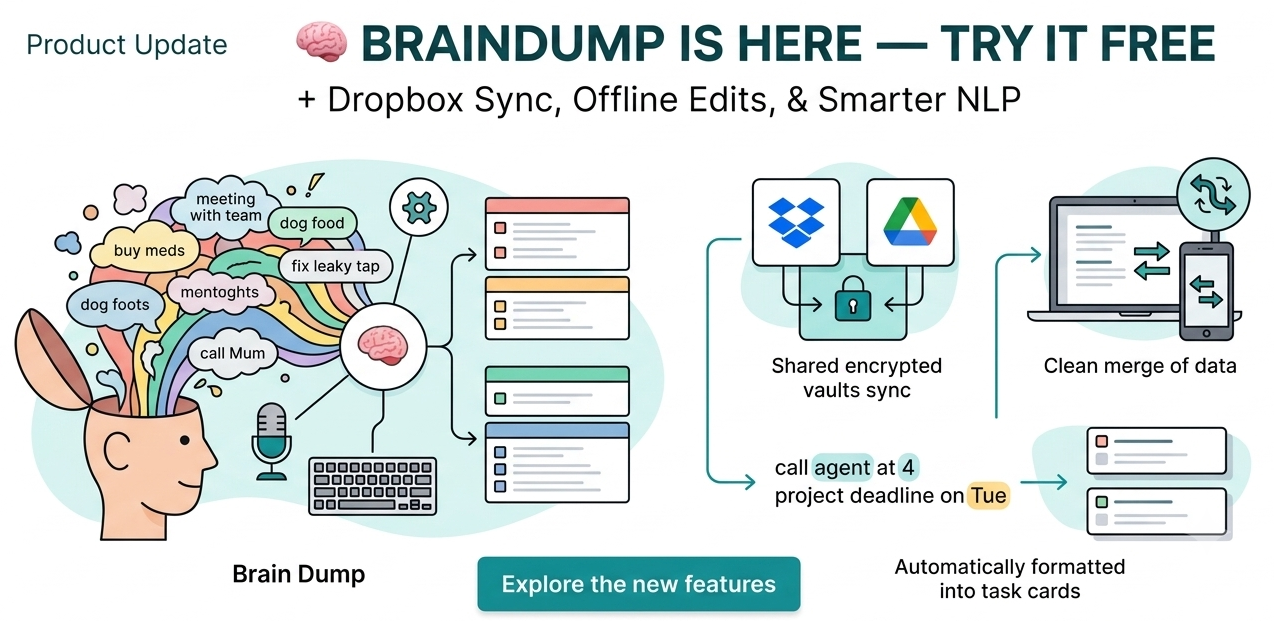
Product update Braindump is here — try it free, plus Dropbox sync A few things have landed in Cadence recently. One of them is a proper new feature, and you don't need to upgrade to try it. 🧠 Braindump This is the main event. Instead of adding tasks to your list one at a time, you can now just talk — or type — everything that's on your mind in one go, in whatever order it comes out. Cadence pulls out the individual tasks for you, has a go at guessing priority from how urgently you phrased something, and lets you check everything over before anything actually gets added. It's built for the days where your head's too full to organise itself, let alone organise a to-do list. Everyone gets one free use to see if it's actually useful for how your brain works — after that it's a Pro feature. 📝 Smarter task adding Available to everyone, no trial needed. Type a task like "pick up meds at 3" and Cadence will detect the time and set it automatically — same for dates. Small thing, but it removes a step from the most repetitive part of using the app. If you're on Pro, timed tasks also get a quiet notification 5 minutes before they're due, so you're not relying on remembering to check the app yourself. 🔄 Dropbox sync Cross-device sync now supports Dropbox alongside Google Drive. Pick whichever you already use — everything's encrypted on your device before it's uploaded, so it's unreadable to Dropbox, to Google, and to us. OneDrive is next, currently stuck behind some Microsoft account setup issues that are out of our hands. No ETA we can honestly give you, but it's not abandoned. 📶 More reliable offline editing If you use Cadence somewhere the connection drops in and out, edits made offline now merge properly when you're back online, rather than risking being silently overwritten. Not glamorous, but it matters. Curious about Pro? See what's included — £5.99/month, cancel any time. As always — bugs, complaints, and ideas are welcome. The feedback button in the app reaches us directly, not a ticket queue. ...
Cadence | 28th June 2026 | Cadence
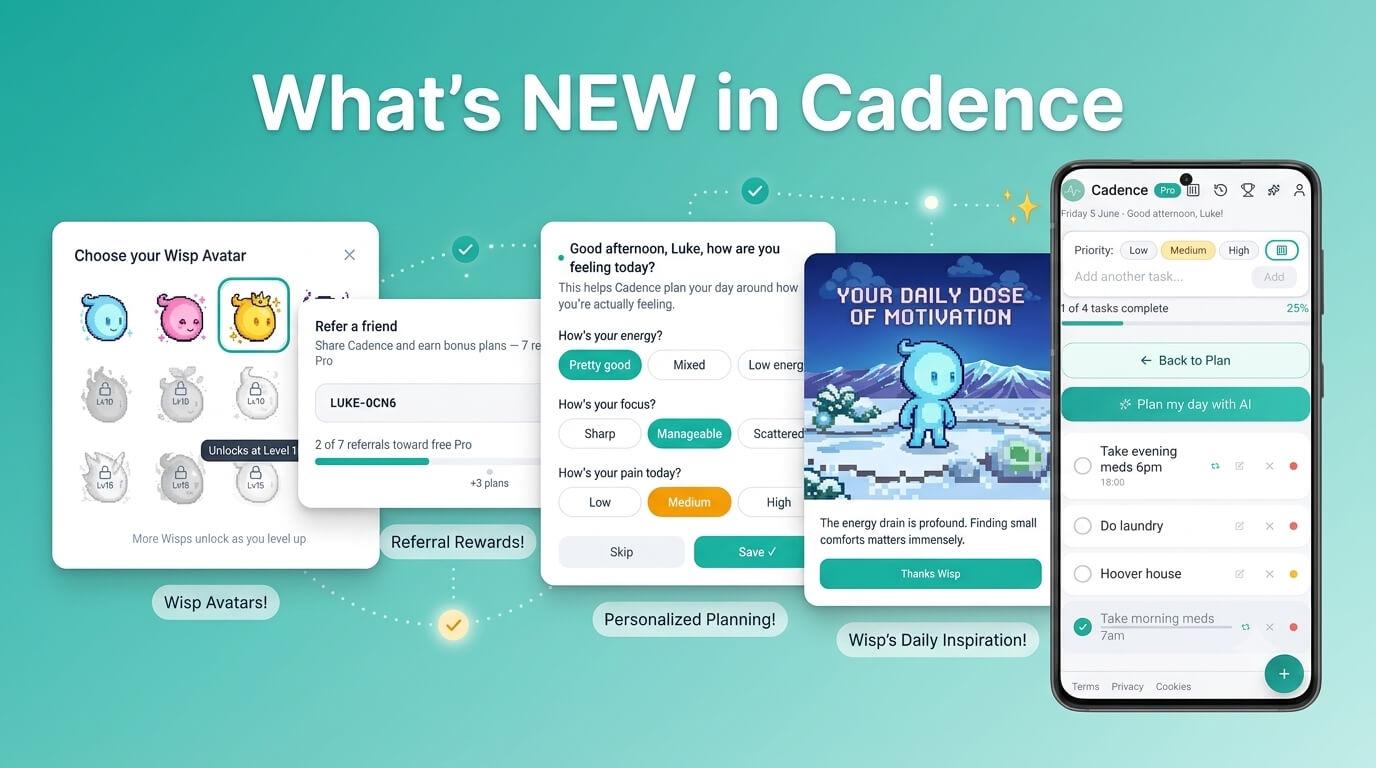
It's been a busy few weeks of building. Some of this came from feedback, some of it from "this should obviously exist and doesn't yet" — but all of it is live now, so here's a proper rundown. Pain is now a first-class option Energy and focus have always been the two things Cadence asks about when building your day. They were never the whole picture for everyone, though — if you live with chronic pain, "low energy" and "high pain" aren't the same thing, and planning around only one of them misses something important. Pain Level is now a third option alongside Energy and Focus, and you're not limited to picking just one. Your check-in and onboarding now let you select any combination — energy, focus, pain, all three, whichever actually describes your situation. The AI scheduling takes whichever you've selected into account, and pain uses its own colour scale rather than reusing energy's (low pain is good, so it's green — the opposite direction to how energy and focus work, which took some care to get right rather than just inverting a slider). Daily Wisp Motivations and App Tips Two new opt-in notification types, both free, both off by default until you turn them on in your profile settings. Wisp Motivations sends a short message each morning — generated to be relevant to your situation where possible, with a sensible fallback when it isn't. We spent a genuinely unreasonable amount of time making sure these don't read like a wellness poster. No "you've got this," no "be gentle with yourself." Just a short, plain, sometimes dryly funny message that doesn't pretend every day is fine. App Tips are occasional nudges toward features you might not have found — things like the mid-day reschedule or fixed task times. Low frequency, genuinely useful rather than "please open the app more." Mark Complete, right from the notification If a task reminder pops up and you've already done the thing, you shouldn't have to open the app just to tick it off. Task reminders now have a Mark Complete button built into the notification itself — tap it, and it's done, no app-opening required. It works even if the app isn't running in the background, and stays in sync with your task list and day plan the next time you do open it. A referral system, with actual rewards If Cadence has been useful to you and you've told a friend, there's now something in it for both of you. Share your referral link (found in your profile), and as people sign up through it: 3 referrals → bonus AI plan generations 5 referrals → more bonus generations 7 referrals → a free month of Pro No gimmicks, no "share to a story" requirements — just a link. A smoother start The first few minutes with Cadence matter more than any other part of the app — if onboarding doesn't make sense, nothing after it gets a chance to. So that's had a proper pass: onboarding now walks you through adding your first couple of tasks and generates an actual AI plan before you're left to your own devices, rather than dropping you into an empty app and hoping you figure out what to do next. The challenge-type selection (energy, focus, pain) is part of that flow now too, and a few overlapping tutorial pop-ups that could fire on top of each other on your first visit have been sorted out so the first session feels calmer rather than chaotic. Security behind the scenes Not a feature you'll see, but one I think is worth saying plainly: Cadence has been through a thorough security hardening pass. That covers things like tightening up how data is protected in the database, locking down server access to sensitive operations, hardening account deletion so it can't be triggered accidentally or maliciously, and adding a proper vulnerability disclosure process so security researchers have a clear, legitimate way to report issues. I'm not going to pretend any solo-built app is bulletproof. But this isn't an afterthought — it's an ongoing priority, especially ...
Cadence | 14th June 2026 | Use Cases
Most productivity apps have an implicit target user: someone with consistent energy, reliable focus, and enough capacity to follow a schedule they set the day before. If that's not you, most apps will just make you feel worse about it. Cadence is built for the other days. The slow starts. The mid-afternoon crashes. The days where you have two hours and need to make them count. What makes it different Before you build your day, Cadence asks how your energy and focus are sitting. It then plans around that — pulling from your task list and matching tasks to what you've actually got. If you're operating at low capacity, it'll prioritise accordingly. Mid-day reschedule is built in. If energy drops further, or something takes longer than expected, you can reset your plan from wherever you are without losing what's already been done. No guilt architecture Tasks that don't get done roll over. There are no streaks to protect. No daily score. No app notifications implying you could have done more. Just a plan that works with your energy instead of against it. Pricing Free tier includes AI planning, task rollover, and push notifications. Pro (£5.99/month) adds Google Calendar sync, cross-device sync, and the Ask Cadence AI chat. No card required to start. 👉 Get Cadence today...